ColorGPT: Enhance your ChatGPT Conversations with Color Coding and Pinning
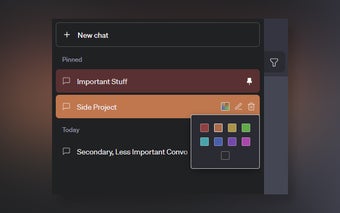
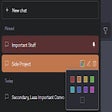
ColorGPT is a Chrome extension developed by awolfe that offers a user interface enhancement for ChatGPT. With ColorGPT, you can now color-code your conversations in a larger sidebar, filter them by color, and even pin them to the top for better organization.
This extension is designed to cater to ChatGPT power users who often find themselves juggling multiple conversations on various topics. By color-coding conversations, users can easily differentiate between different topics or prioritize important discussions. Additionally, pinning conversations to the top ensures that important chats are always within reach.
One notable feature of ColorGPT is its automatic scrolling of the chat history sidebar upon initial load. While this feature helps populate all pinned conversations, the developer is actively working on optimizing it further. However, users may still need to manually scroll down the sidebar if not all pinned messages are visible.
Please note that ColorGPT currently supports screen sizes larger than approximately 1366px width. It is also recommended to rename a conversation to your preferred title before coloring or pinning it. While renaming a conversation after applying color or pinning is possible, it will remove the color and pin, requiring users to potentially search for the conversation again to reapply the desired settings.
[Updated: ]
Recently, the CSS/JS of ColorGPT has been updated to match the new HTML structure of ChatGPT, ensuring a seamless experience for users.